Pact contract testing for maven projects
Pact contract testing for maven projects
Intro to contract testing and Pact
In the world of microservices, contract testing plays a crucial role in catching issues early, long before they become integration headaches. Whether it’s a REST API, an asynchronous call, or any other form of communication between services, the real pain usually surfaces when two independently developed services are finally integrated. By then, a small mismatch in expectations can lead to unexpected failures. This is exactly where contract testing comes to the rescue, it allows teams to detect gaps early, be it in data fields, protocols, or any other aspect of communication between services.
The concept of contract testing is straightforward. Before diving into implementation, the teams responsible for the services agree on a contract, essentially, a shared understanding of what each service expects from the other. This agreement is then documented using artifacts, which act as a blueprint for development. With this in place, both the producer and consumer teams can build their services confidently, knowing that they won’t violate the agreed-upon contract.
The benefits go beyond just early detection. Contract testing ensures that any feature releases or updates don’t break existing communication. Essentially, it provides a safety net, so you can always be sure that the contract remains intact, regardless of how your services evolve.
One popular solution for contract testing is Pact, which focuses on consumer-driven contract testing. In this approach, the consumer defines the expected interactions, while the producer verifies that it can meet those expectations. The beauty of Pact lies in this collaboration: the consumer specifies what it needs, and the producer ensures it can deliver.
In this article, we’ll explore how to define producer and consumer contracts in Pact for Java services using Maven as the package manager. We’ll also cover how to host a Pact Broker to store JSON-based interaction artifacts and share them across teams. Finally, we’ll take a look at integrating contract testing into a GitHub Actions CI/CD workflow, ensuring that your contracts are always verified as part of your build process.
Demo contract for which we will write a contract test
Let's say, we are building a kitchen app for modular kitchen. This app has a section to view the inventory by the location and container. The UI allows you to search an item in the kitchen. For this the UI requests the searched keyword from the backend and the backed provides the location and container details to the UI.
The architect decides to develop 2 micro-services, one for the frontend UI app and another for the backend. Now, both the teams will start working independently. Both the teams will be ready in few months and we will integrate. But what if UI was expecting some filed with name "location" and backend was sending this data under "kitchen_location". Or maybe UI was expecting "location" as location string and backed is sending "location" as location id (int).
These kinds of inconsistencies during the final phases of app are not something any stakeholder would want. During the time of sealing the contract, we can agree on the contract and propose a final deal. And most probably we could manually check the contract on both the ends and be good with the development.
But let's say our app is producing huge profits and now we want to add another feature related to location. And during this development, we will want to ensure the previous feature contracts are not violated. Checking these manually all the time we deliver new feature is a huge pain for both the teams. This is where PACT comes in. PACT helps developer write tests for the contract and seal it for the future.
Here, we have 2 interactions, UI is sending keyword to Backend and Backend is sending the details to UI.
Let's say we agree on UI to Backed contract to be a JSON in below format. There will be a field, "key" and UI will send the keyword in lower case. The communication will happen via REST API, POST scheme on URI, /kitchen/get_item_location.
{
	"key": "rice"
}
The backend will send a JSON response described below with 200 if the item is found else it will send 404. Everything in lower case.
{
	"location": "side_rack",
	"container": "round_bowl"
}
Now we will write a PACT test and seat the contract. Development will come later.
Maven Dependencies
Just add both or one of the dependencies you would be using. If you are a consumer and want to write only the consumer tests then, you can include only the consumer dependency, and if you want to write test for producer, then you will producer dependencies. Here I will be using both the dependencies, because I will be writing both the test as a POC.
Consumer Dependencies
<dependency>
  <groupId>au.com.dius.pact.consumer</groupId>
  <artifactId>junit5</artifactId>
  <version>4.6.18</version>
  <scope>test</scope>
</dependency>
Producer Dependencies
<dependency>
  <groupId>au.com.dius.pact.provider</groupId>
  <artifactId>junit5</artifactId>
  <version>4.6.18</version>
  <scope>test</scope>
</dependency>
Consumer Test
The first duty of consumer is to define an interaction which is basically what will be the input and output expected from the producer. And then it will write unit tests on top of this information.
Below is what we have defined the consumer interaction (in V4 pact schema).
The annotation @Pact names the consumer as KitchenUI and provider as KitchenServer.
The below interaction is basically saying, when client calls /kitchen/get_item_location with data as key: rice. Server will response with location as left side drawer and container as red bowl.
@ExtendWith(PactConsumerTestExt.class)
public class PactConsumerTest {
	@Pact(consumer = "KitchenUI", provider = "KitchenServer")
	public V4Pact kitchenItemLocationFeature(PactBuilder builder) {
	  return builder
	      .usingLegacyDsl()
	      .uponReceiving("A request to get item details")
	      .path("/kitchen/get_item_location")
	      .method("POST")
	      .body("{\"key\": \"rice\"}")
	      .willRespondWith()
	      .status(200)
	      .body("{\"location\": \"left_side_drawer\", \"container\": \"red_bowl\"}")
	      .toPact(V4Pact.class);
	}
}
The unit test against this interaction will also be defined under the same class as follows.
The test for the interaction is defined under pactMethod. This should be same as the method name for the interaction.
In the unit test, consumer is calling the mock api and mock api returning the response which should be returned by actual server.
@Test
@PactTestFor(pactMethod = "kitchenItemLocationFeature")
void testKitchenServer(MockServer mockServer) throws Exception {
    String url = mockServer.getUrl() + "/kitchen/get_item_location";

    HttpRequest request = HttpRequest.newBuilder()
        .uri(new java.net.URI(url))
        .header("Content-Type", "application/json")
        .POST(java.net.http.HttpRequest.BodyPublishers.ofString("{\"key\": \"rice\"}"))
        .build();

    HttpClient client = HttpClient.newHttpClient();

    HttpResponse<String> response = client.send(request, HttpResponse.BodyHandlers.ofString());

    assertEquals(200, response.statusCode());
    assertEquals("{\"location\": \"left_side_drawer\", \"container\": \"red_bowl\"}", response.body());
}
With this, the contract on client side is sealed. Now client can go on developing its logic after consuming the response.
Running this test will create an interaction JSON which is described below.
Consumer Interaction JSON
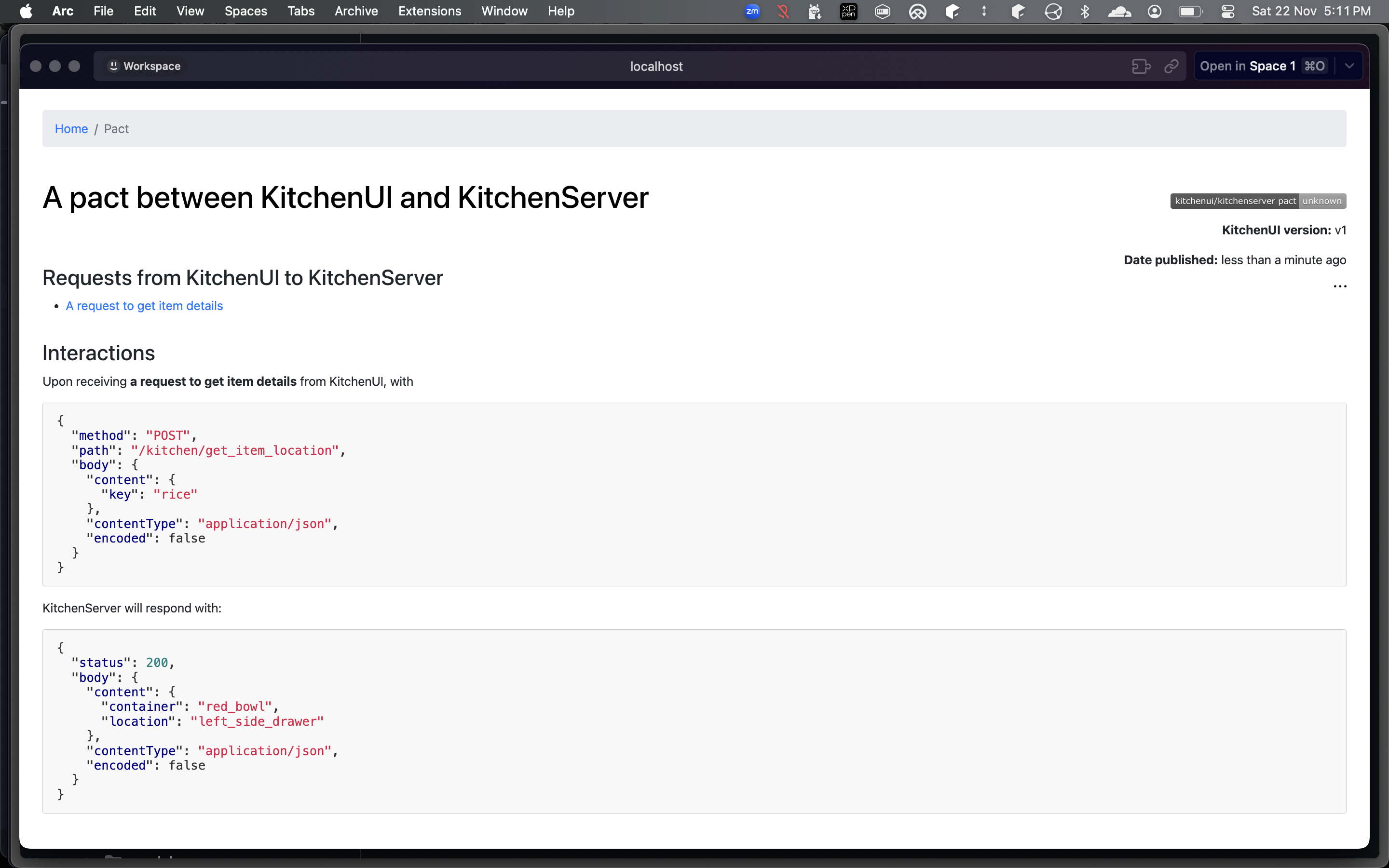
The interaction JSON is saved under, target/pacts by default with naming convention as ConsumerName-ProducerName.json. For this interaction it is KitchenUI-KitchenServer.json.
Below is what interaction JSON looks like. There are many meta-data. But the most important part is interactions -> request and interactions -> response, which defines our interaction clearly.
We will upload this json to pact broker so that producer can test against it.
{
  "consumer": {
    "name": "KitchenUI"
  },
  "interactions": [
    {      "comments": {
        "text": [

        ]      },      "description": "A request to get item details",
      "key": "f0c7178e",
      "pending": false,
      "request": {
        "body": {
          "content": {
            "key": "rice"
          },
          "contentType": "application/json",
          "encoded": false
        },
        "method": "POST",
        "path": "/kitchen/get_item_location"
      },
      "response": {
        "body": {
          "content": {
            "container": "red_bowl",
            "location": "left_side_drawer"
          },
          "contentType": "application/json",
          "encoded": false
        },
        "status": 200
      },
      "transport": "http",
      "type": "Synchronous/HTTP"
    }
  ],  "metadata": {
    "pact-jvm": {
      "version": "4.6.18"
    },
    "pactSpecification": {
      "version": "4.0"
    }
  },  "provider": {
    "name": "KitchenServer"
  }
}
Upload this to pact broker using PACT CLI
The json artifacts can be uploaded to pact broker using PACT CLI.
You need to download the cli tool using the below command.
curl -fsSL https://raw.githubusercontent.com/pact-foundation/pact-ruby-standalone/master/install.sh | PACT_CLI_VERSION=v2.0.2 bash
After installing the tool, you can run the below command to push the json on broker.
pact-broker publish target/pacts/*.json \
--consumer-app-version=v1 \
--broker-base-url="http://localhost:9292" \
--broker-username="admin" \
--broker-password="password"
Below is how it looks like on the UI.
You can see the consumer registered on the home page. Important thing to note is "Last verified" is empty. Once provider test starts verifying the contract, we will have entries in this field.

Producer Test
Now, its time to seal the provider contract using the interaction json produced by consumer.
The provider test will fail as the API is not yet developed. But after the full development of API this should not be the case.
@Provider("KitchenServer")
@PactBroker
public class PactProviderTest {

  @TestTemplate
  @ExtendWith(PactVerificationInvocationContextProvider.class)
  void verifyPacts(PactVerificationContext context) {
    context.verifyInteraction();
  }}
Running provider test is a bit different. You need to provide a pact broker to connect with for downloading json artifacts. Below is the command to do so.
mvn verify \
-Dsurefire.includes='**/PactProviderTest.java' \
-Dpact.verifier.publishResults=true \
-Dpactbroker.url=http://localhost:9292 \
-Dpactbroker.auth.username=admin \
-Dpactbroker.auth.password=password
As the verification will fail, you will see a red entry on the homepage indicating the provider does not have any such interaction that client expects.

And in a few days (for us it was 20 mins), backend was ready and now server successfully executed the interaction.

Pact Broker
Launching your own instance of Pact Broker
This can be done quickly using docker compose. Pact broker needs a database, here I'll use postgres.
Just copy paste the below yaml in a file called docker-compose.yml and run the broker using docker compose up -d. This will launch both postgres and pact broker. You can access the broker UI at localhost:9292.
version: '3.8'

services:
  postgres:
    image: postgres:16
    container_name: postgres-db
    restart: unless-stopped
    environment:
      POSTGRES_USER: guest
      POSTGRES_PASSWORD: guest
      POSTGRES_DB: GreyOrange
    ports:
      - "5432:5432"
    volumes:
      - postgres_data:/var/lib/postgresql/data
    networks:
      - monitoring

  pact-broker:
    image: pactfoundation/pact-broker:latest
    depends_on:
      - postgres
    ports:
      - "9292:9292"
    environment:
      PACT_BROKER_DATABASE_ADAPTER: postgres
      PACT_BROKER_DATABASE_USERNAME: guest
      PACT_BROKER_DATABASE_PASSWORD: guest
      PACT_BROKER_DATABASE_HOST: postgres
      PACT_BROKER_DATABASE_NAME: GreyOrange

      PACT_BROKER_BASIC_AUTH_USERNAME: admin
      PACT_BROKER_BASIC_AUTH_PASSWORD: password

    healthcheck:
      test: ["CMD", "wget", "-qO-", "http://localhost:9292"]
      interval: 10s
      timeout: 5s
      retries: 5
    networks:
      - monitoring


volumes:
  pact_postgres:
networks:
  monitoring:
    driver: bridge
CICD using Github Action
name: Pact Tests

on:
  workflow_dispatch:
    inputs:
      target_branch:
        required: false
        type: string
        default: develop
        description: The target branch for manual builds, defaults to 'develop'
  workflow_call:
    inputs:
      target_branch:
        required: false
        type: string
        default: develop
        description: The target branch for manual builds, defaults to 'develop'

permissions:
  contents: read
  id-token: write
  actions: read
  pull-requests: read

jobs:
  pact-tests:
    name: Pact Tests
    runs-on: ubuntu-latest

    steps:
      - name: Checkout target branch
        uses: actions/checkout@v4
        with:
          ref: ${{ inputs.target_branch }}

      - uses: actions/setup-java@v5
        timeout-minutes: 5
        with:
          distribution: 'temurin'
          java-version: '21'

      - name: Install Pact CLI
        run: |
          echo "Downloading Pact CLI..."
          curl -fsSL https://raw.githubusercontent.com/pact-foundation/pact-ruby-standalone/master/install.sh | PACT_CLI_VERSION=v2.0.2 bash

      - name: Build Jar
        run: |
	      ./mvnw clean install -DskipTests
      - name: Run Pact Consumer Tests
        run: |
          ./mvnw verify \
          -Dsurefire.includes='**/*PactConsumer*.java'
      - name: Publish Pact Interaction JSONs to Pact Broker
        continue-on-error: true
        env:
          BROKER_URL: ${{ vars.PACT_BROKER_URL }}
          BROKER_USERNAME: writer
          BROKER_PASSWORD: ${{ secrets.PACT_BROKER_WRITER }}
        run: |
          cd workspace
          pact_dir="target/pacts"
          if compgen -G "$pact_dir/*.json" > /dev/null; then
          echo "Publishing all pact files from $pact_dir"
          pact-broker publish "$pact_dir" \
          --branch="master" \
          --consumer-app-version="v1" \
          --broker-base-url="${BROKER_URL}" \
          --broker-username="${BROKER_USERNAME}" \
          --broker-password="${BROKER_PASSWORD}"
          else
	          echo "No pact files found."
          fi
      - name: Run Pact Provider Tests
        env:
          BROKER_URL: ${{ vars.PACT_BROKER_URL }}
          BROKER_USERNAME: writer
          BROKER_PASSWORD: ${{ secrets.PACT_BROKER_WRITER }}
        run: |
          cd workspace
          ./mvnw verify[[]()]() \
            -Dsurefire.includes='**/*PactProvider*.java' \
		    -Dpact.verifier.publishResults=true \
			-Dpact.pactbroker.httpclient.usePreemptiveAuthentication=true \
			-Dpactbroker.scheme=https \
			-Dpact.provider.version="v1" \
			-Dpact.provider.tag="develop" \
			-Dpactbroker.url="${BROKER_URL}" \
			-Dpactbroker.auth.username="${BROKER_USERNAME}" \
			-Dpactbroker.auth.password="${BROKER_PASSWORD}"